Our Solicitor Certifies Your Documents for FCDO e-Apostille
Eligible UK documents digitally signed and prepared for fast electronic legalisation
Our solicitor is registered with the FCDO
1–2 working days
FCDO e-Apostille option




About the Author
KH is a practising solicitor based in London, admitted in England & Wales and regulated by the Solicitors Regulation Authority. He is registered with the Foreign, Commonwealth & Development Office. KH has worked as legal counsel and in-house solicitor across leading firms and corporations. He personally oversees every apostille and legalisation case at Ginkgo Advisory, ensuring consistency, accuracy, and end-to-end quality control.
KH Lam, LLB, LLM
Legal Consultant of Ginkgo Advisory
What Does a QES or Digital Solicitor Signature Look Like?
A digital solicitor signature is not just a picture of a signature.
For an FCDO e-Apostille, the PDF must meet the correct digital signing requirements. GOV.UK explains that applicants must upload PDF documents electronically signed by a UK notary or solicitor.
This means the signature should do more than show an image on the page. It should help the recipient check who signed the PDF and whether the document has changed after signing.
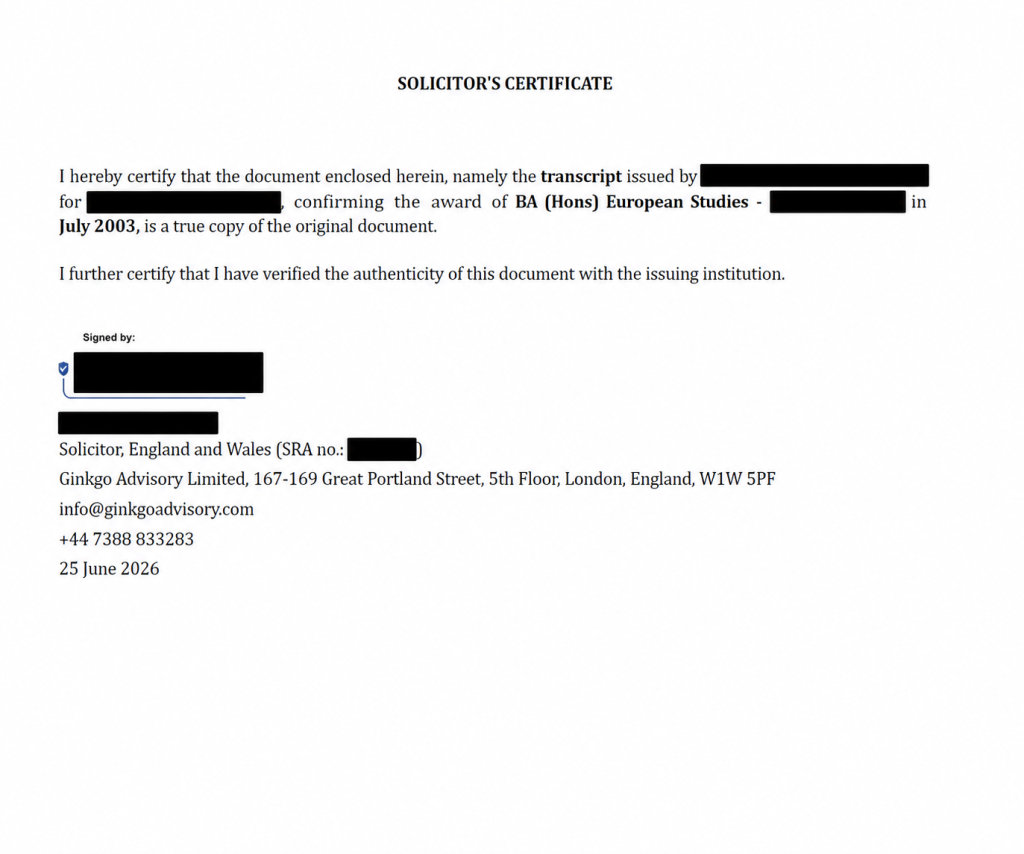
A Digital Signature May Show a Visible Signature Box
A digitally signed PDF may show a visible signature box on the page.
That box may include:
- a handwritten-style signature mark
- the words “Signed by”
- the signer’s name
- the signer’s professional title
- the solicitor’s details
- the date of signature
However, the visible box only shows part of the signature.
The PDF itself holds the real validation data.
The Signature Should Connect to the PDF
A certificate-based digital signature links the signer to the PDF file.
It can also help the recipient check whether anyone changed the document after signing.
This is different from a scanned signature image. A scanned image may look like a signature, but it does not give the same certificate-based validation.
Therefore, overseas recipients should not judge a digital solicitor signature only by how it looks on the page.
What Does QES Mean?
QES usually means Qualified Electronic Signature.
Under eIDAS, electronic signatures have different levels. The European Commission explains that qualified electronic signatures meet the highest level of requirements. They rely on a qualified certificate and a qualified signature creation device.
In practical terms, a QES or strong certificate-based signature may help the recipient check:
- who signed the document
- whether the signer used a trusted certificate
- when the signer signed the document
- whether anyone changed the document after signing
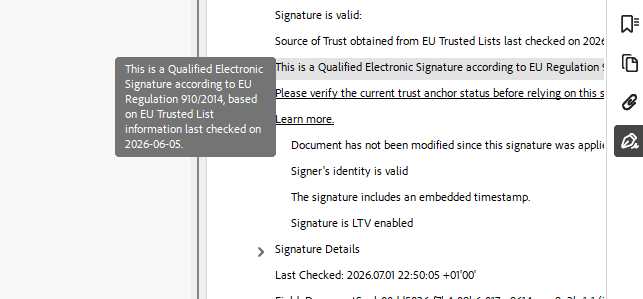
How to Check the Signature in Adobe Reader
The recipient should open the PDF in Adobe Reader and check the signature panel.
Adobe Reader allows users to validate signatures through the Signatures panel. It also lets users review the signer’s certificate details through Signature Properties.
This helps the recipient inspect the signature beyond the visible signature box.
Why This Matters for FCDO e-Apostille
For eligible documents, our solicitor can prepare a solicitor-certified PDF for FCDO e-Apostille.
The process may include:
- checking the document
- verifying authenticity where possible
- preparing enhanced solicitor certification
- applying an electronic solicitor signature
- submitting the PDF for FCDO e-Apostille
Our solicitor has a digital signature registered with the FCDO for e-Apostille purposes.
This helps create a clear legalisation chain for overseas use:
document check → solicitor certification → solicitor digital signature → FCDO e-Apostille
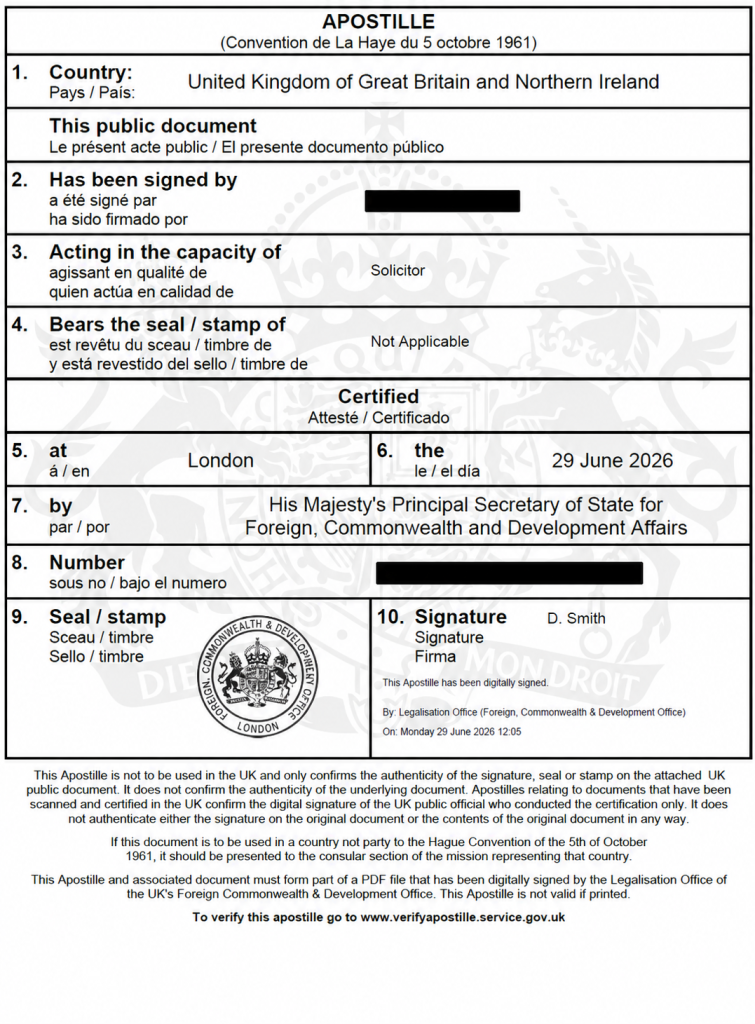
Enhanced Certification Gives More Context
Some recipients want more than a certified copy.
They may ask whether the solicitor checked the document with the issuer, university, professional body or official source.
Where a reliable verification route exists, our solicitor can prepare enhanced certification wording. This wording can explain the checks carried out before certification.
As a result, the overseas recipient receives more context about the document and the certification process.
Need a Solicitor-Certified PDF for e-Apostille?
Ginkgo Advisory can help with eligible UK documents.
Our solicitor can verify, certify and digitally sign PDFs for FCDO e-Apostille submission. This service may suit academic, professional, personal and commercial documents where the recipient accepts the e-Apostille route.
FAQ
What does a QES solicitor signature look like?
A QES or digital solicitor signature may show a visible signature box, signer name, professional capacity and signing date. However, the key validation details sit inside the PDF and can be checked through the signature panel.
Is a scanned signature the same as a digital signature?
No. A scanned signature image does not provide the same certificate-based validation as a proper digital PDF signature.
Why does the FCDO need a solicitor signature?
For many private documents, a UK solicitor can certify the document first. The FCDO then legalises the solicitor’s signature or professional capacity.
Can your solicitor digitally sign documents for e-Apostille?
Yes. Our solicitor has a digital signature registered with the FCDO for e-Apostille purposes.
Contact Us



Address
Suite 161, 30 Red Lion Street, London, TW9 1RB, England