Our Solicitor Certifies Your Documents for FCDO e-Apostille
Eligible UK documents digitally signed and prepared for fast electronic legalisation
Our solicitor is registered with the FCDO
1–2 working days
FCDO e-Apostille option


About the Author
KH is a practising solicitor based in London, admitted in England & Wales and regulated by the Solicitors Regulation Authority. He is registered with the Foreign, Commonwealth & Development Office. KH has worked as legal counsel and in-house solicitor across leading firms and corporations. He personally oversees every apostille and legalisation case at Ginkgo Advisory, ensuring consistency, accuracy, and end-to-end quality control.
KH Lam, LLB, LLM
Legal Consultant of Ginkgo Advisory
What Does an FCDO e-Apostille Look Like?
Many people expect an apostille to look like a paper certificate attached to a physical document.
An FCDO e-Apostille looks different.
It is a digital PDF package issued through the UK Foreign, Commonwealth & Development Office Legalisation Office. Instead of receiving a paper certificate, you receive a PDF file that contains the legalised document, the e-Apostille certificate and electronic signatures.
This guide explains what an FCDO e-Apostille looks like, what each part means and how our solicitor can help prepare eligible documents for digital legalisation.
A UK e-Apostille Is a Digital PDF Package
An e-Apostille is not just a scan of a paper apostille.
It is a digitally legalised PDF file. The FCDO e-Apostille package usually includes:
- an e-Apostille cover sheet
- the public document being legalised
- the e-Apostille certificate
- electronic signature information
- an apostille reference number
- verification instructions
GOV.UK explains that an electronic apostille, known as an e-Apostille, requires PDF documents electronically signed by a UK notary or solicitor.
The First Page Is Usually the e-Apostille Cover Sheet
The first page normally acts as a cover sheet.
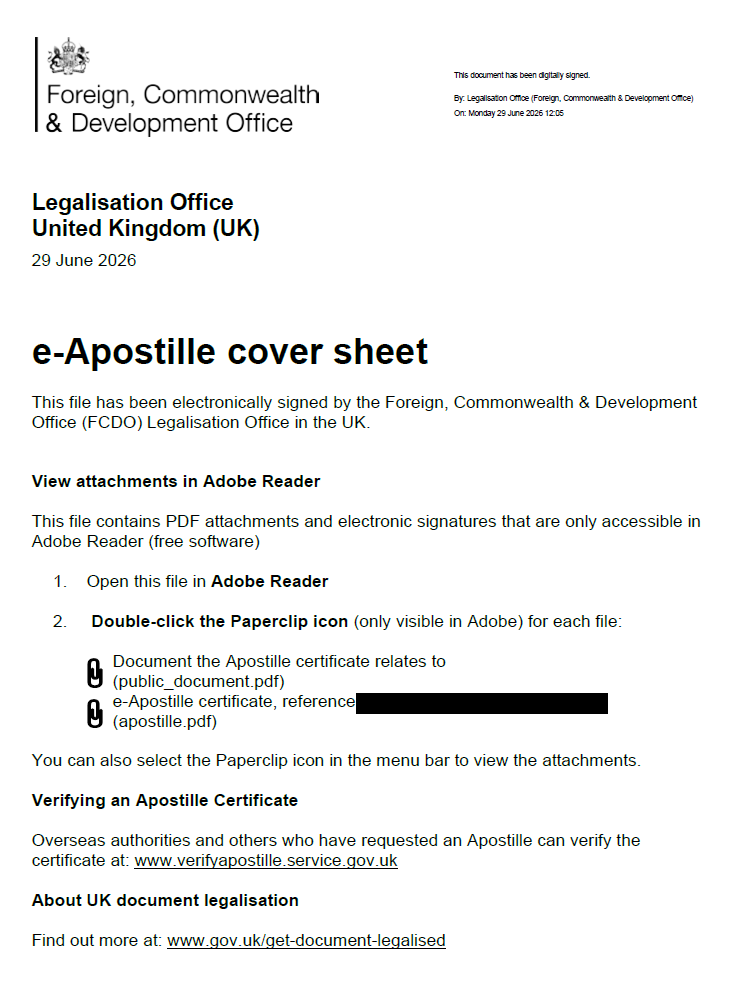
It identifies the FCDO Legalisation Office and confirms that the file has been electronically signed by the FCDO Legalisation Office in the UK. The cover sheet also gives instructions for opening the PDF correctly.
In the sample document, the cover sheet explains that the file contains PDF attachments and electronic signatures. It also tells the recipient to open the file in Adobe Reader and use the paperclip icon to view the attached files.
This is important because some browser previews do not show the full e-Apostille package.
The e-Apostille Certificate Is Attached Inside the PDF
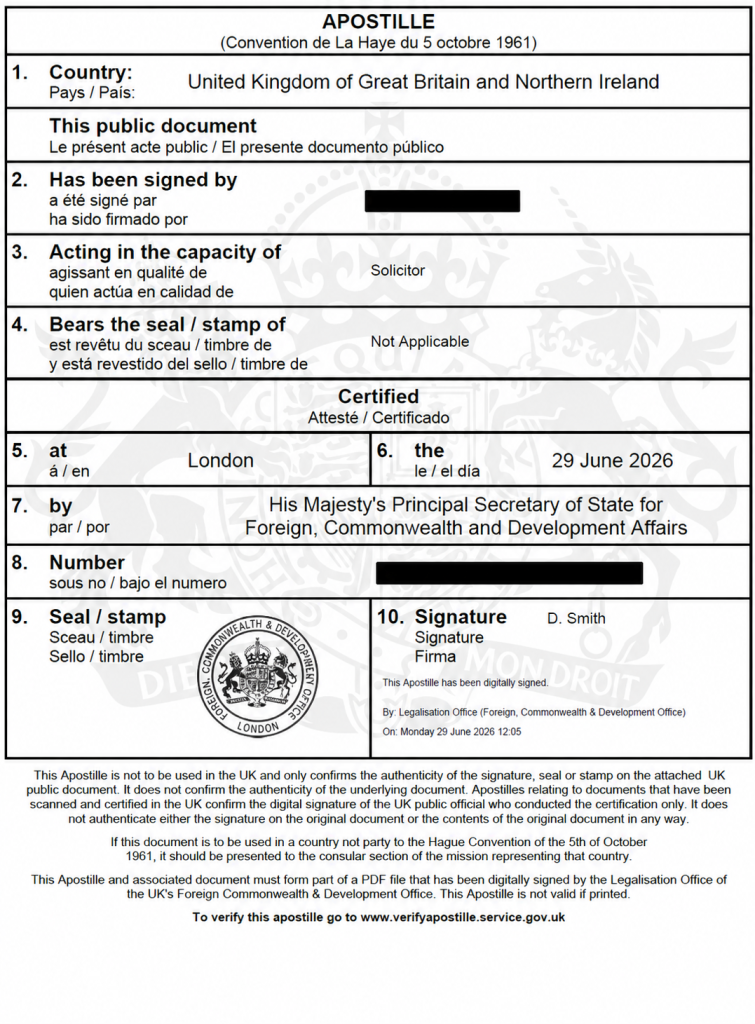
The apostille certificate normally appears as a PDF attachment inside the main legalised PDF.
It usually follows the Hague Apostille format and includes key fields such as:
- country
- name of the person whose signature has been legalised
- professional capacity
- place of certification
- date
- apostille number
- seal or stamp
- FCDO signature information
Where our solicitor certifies a document, the FCDO e-Apostille usually legalises the solicitor’s signature, capacity or related official details.
As a result, the legalisation chain becomes easier to understand:
document → solicitor certification → solicitor digital signature → FCDO e-Apostille
Also Attaching the Public Document
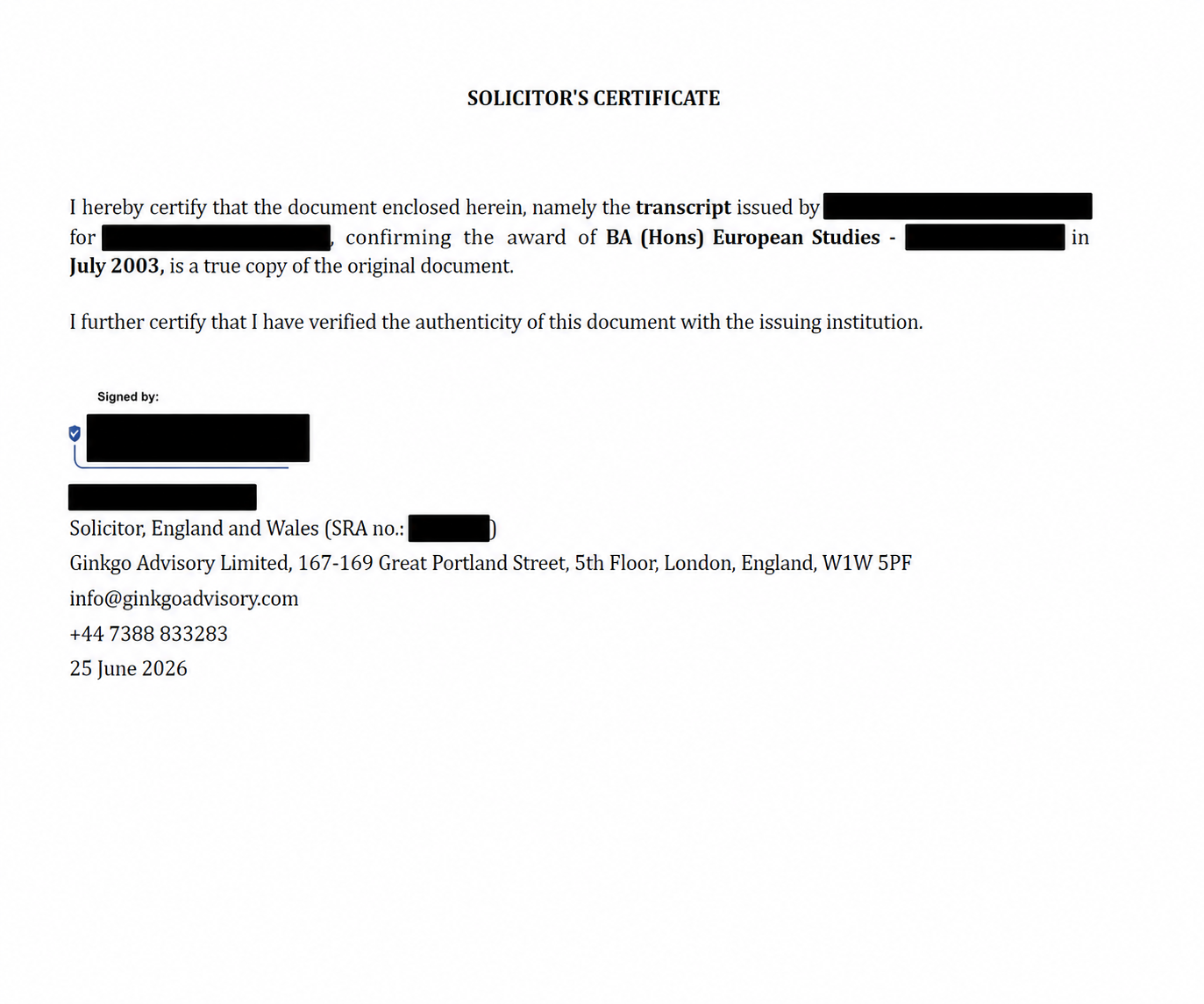
The public document is the document that the apostille relates to.
For solicitor-certified documents, this may include the solicitor’s certificate and the underlying document. For example, it may include a certified copy of an academic document, company document, passport copy, power of attorney, professional certificate or other eligible document.
If the PDF contains more than one document, the e-Apostille may apply to the combined PDF package. Therefore, you should check whether the overseas recipient wants one apostille for a bundle or a separate apostille for each document.
Why the File Should Stay Digital
An FCDO e-Apostille works best as a digital file.
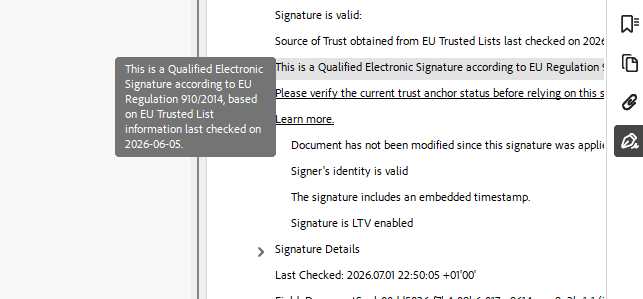
The electronic signatures and attachments sit inside the PDF. If someone prints the PDF, the recipient may lose the ability to inspect the embedded attachments and signature data.
Therefore, you should normally send the original legalised PDF by email or upload it to the recipient’s portal.
How Our Solicitor Helps
Our solicitor can help prepare eligible UK documents for FCDO e-Apostille.
This may include:
- checking whether the document is suitable for e-Apostille
- verifying the document where possible
- preparing enhanced solicitor certification
- applying an accepted electronic solicitor signature
- arranging the FCDO e-Apostille application
- guiding you on how to share the legalised PDF
Our solicitor’s digital signature is registered with the FCDO for e-Apostille purposes.
This helps eligible documents move through the digital legalisation route more efficiently.
Need Help with an FCDO e-Apostille?
Ginkgo Advisory provides solicitor-led e-Apostille support for eligible UK documents.
Send us the document, the destination country and the overseas recipient’s instructions. We will review the document and advise whether the FCDO e-Apostille route is suitable.
FAQ
What does an FCDO e-Apostille look like?
It usually looks like a digitally signed PDF package. It contains a cover sheet, attached public document, attached apostille certificate, reference number and electronic signature information.
Is an e-Apostille a paper certificate?
No. An e-Apostille is for digital use. A paper apostille is a different format.
Why can I only see the cover sheet?
You may be opening the PDF in a browser preview. Open the file in Adobe Reader and check the paperclip attachments.
Can our solicitor help with the e-Apostille?
Yes. Our solicitor can verify, certify and electronically sign eligible documents for FCDO e-Apostille submission.
Contact Us



Address
Suite 161, 30 Red Lion Street, London, TW9 1RB, England